
Mount Fuji Viewer1.1 - App Store
You'll be able to see results in few seconds.
Publisher Description
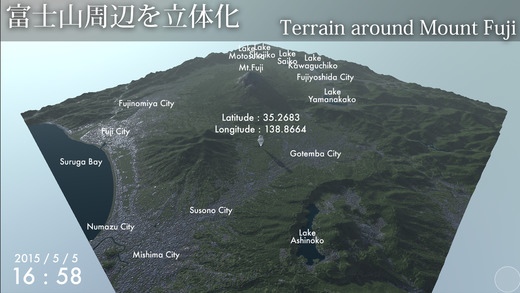
About 50km square terrain around Mount Fuji. Interactively to see the diorama can be viewed in a different perspective. Realistic texture representation not had put a mere satellite photo is the feature.
Since we have reproduced the movement of the sun and the moon, when and where from one diamond Fuji is visible if you look, you can give an approximate indication of such.
Also it changes the look of the earth's surface such as the amount of snow depending on the season.
** How to use **
- Screen swipe
It will rotate the view.
- Tap the ground
Go to the position where the white Avatar taps, there will be the center point of view.
- 2-finger pinch, pinch out
Zoom in to the point of view center, it will zoom out.
- Date and time specified
Year, month, day, you will specify the time in the up and down buttons. Time I can be controlled even in the bottom of the screen slider.
- "Time Lapse" button
You go 120 times faster than the actual time. Movement of the sun and clouds will be faster as time-lapse photography.
- "Landmarks" button
The name display, such as a lake or a city.
- "City Lights" button
It will turn on and off the lights of the city. If you turn off the lights of the city when the moon is out, so that you see the surface of the earth that was illuminated by the moonlight.
- Clouds slider
It will control the amount of cloud.
- Terrestrial perspective mode
When you tap the avatar will be the point of view of when it stood in its place. It will overlook the surrounding screen swipe.
- Avatar hide
When you tap a location other than the ground Avatar is hidden.
Requires iOS 7.1 or later. Compatible with iPhone, iPad, and iPod touch.
About Mount Fuji Viewer
The company that develops Mount Fuji Viewer is Kei Wakizuka. The latest version released by its developer is 1.1.
To install Mount Fuji Viewer on your iOS device, just click the green Continue To App button above to start the installation process. The app is listed on our website since 2015-05-19 and was downloaded 0 times. We have already checked if the download link is safe, however for your own protection we recommend that you scan the downloaded app with your antivirus. Your antivirus may detect the Mount Fuji Viewer as malware if the download link is broken.
How to install Mount Fuji Viewer on your iOS device:
- Click on the Continue To App button on our website. This will redirect you to the App Store.
- Once the Mount Fuji Viewer is shown in the iTunes listing of your iOS device, you can start its download and installation. Tap on the GET button to the right of the app to start downloading it.
- If you are not logged-in the iOS appstore app, you'll be prompted for your your Apple ID and/or password.
- After Mount Fuji Viewer is downloaded, you'll see an INSTALL button to the right. Tap on it to start the actual installation of the iOS app.
- Once installation is finished you can tap on the OPEN button to start it. Its icon will also be added to your device home screen.
Program Details
System requirements
Download information
Pricing
Version History
version 1.1
posted on 2015-05-19
Disclaimer
Official App Store Link
We do not host Mount Fuji Viewer on our servers. We did not scan it for viruses, adware, spyware or other type of malware. This app is hosted by Apple and passed their terms and conditions to be listed there. We recommend caution when installing it.
The App Store link for Mount Fuji Viewer is provided to you by apps112.com without any warranties, representations or guarantees of any kind, so access it at your own risk.
If you have questions regarding this particular app contact the publisher directly. For questions about the functionalities of apps112.com contact us.
